Today I am going to show you how to write an auto number plugin for CRM 2011.
Here are the aims of this plugin
- First and foremost it should be able to generate auto numbers
- Can be used for multiple entities
- Can be ported to multiple organisations
- Should be configurable from the interface
- We should be able to change the starting number
- We should be able to change the increment number
- We should be able to change the prefix/suffix and add any separators
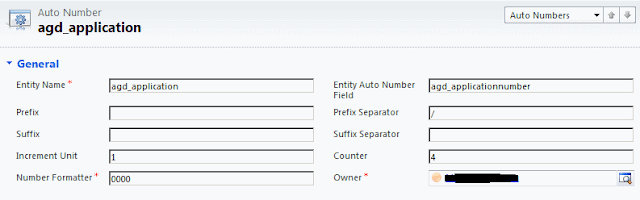
To generate the auto number we are first going to create an auto number entity. This entity will hold all our autonumbers as well as any formatting.
 |
| Auto Number Entity |
As you can see from the screen shot the auto number entity contains the following fields:
Entity Name: this would hold the name of the entity where you want to apply the auto number to
Entify Autonumber Field: this is the field of the Entity that would show and hold the autonumber.
Prefix, Prefix Separator, Suffix and Suffix Separator are self explanatory.
Increment unit: It is the increment number for the auto number field.
Counter: It is the starting number for the auto number field and it will subsequently show the incremented number as updated in the plugin.
Number formatter: This is a formatter that will be applied to the number field (i.e. counter) so for example the counter is 544 and the formatter is 0000 that will end up being 0544.
Okay so now that we have our auto number entity set up, we need to write the plugin.
public class AutoNumberPlugin:IPlugin
    {
        public void Execute(IServiceProvider serviceProvider)
        {
            Microsoft.Xrm.Sdk.IPluginExecutionContext context = (Microsoft.Xrm.Sdk.IPluginExecutionContext)
                serviceProvider.GetService(typeof(Microsoft.Xrm.Sdk.IPluginExecutionContext));
            if (context.InputParameters.Contains("Target") &&
            context.InputParameters["Target"] is Entity)
            {
                Entity entity = (Entity)context.InputParameters["Target"];

                IOrganizationServiceFactory serviceFactory = (IOrganizationServiceFactory)serviceProvider.GetService(typeof(IOrganizationServiceFactory));
                IOrganizationService service = serviceFactory.CreateOrganizationService(context.UserId);

                string fetchXml = @"<fetch mapping='logical'>
                                            <entity name='agd_autonumber'><all-attributes/>
                                                <filter type=""and"">
                                                        <condition attribute=""agd_entityname"" operator=""eq"" value='" + entity.LogicalName + "'" + " /></filter></entity></fetch>";
                System.Threading.Mutex mtx = null;

                try
                {

                    string mutextName = string.Format("{0}{1}", entity.LogicalName, "Autonumber");
                    mtx = new System.Threading.Mutex(false, mutextName);

                    mtx.WaitOne();
                    //get hold on the mutex and only release it after update was done ot the agd_counter entity
                    // not sure if this will work in a multi server environment

                   EntityCollection result = service.RetrieveMultiple(new FetchExpression(fetchXml));
                    string nextIncrementNumber = string.Empty;
                    if (result.Entities.Count == 1)
                    {
                        //retrieve the counter
                        Entity autoNumber = result.Entities[0];
                        if (!autoNumber.Attributes.Contains("agd_counter"))
                            throw new InvalidPluginExecutionException("agd_counter must contain a value");
                        if (!autoNumber.Attributes.Contains("agd_incrementunit"))
                            throw new InvalidPluginExecutionException("agd_incrementunit must contain a value");

                        int counter = Int32.Parse(autoNumber.Attributes["agd_counter"].ToString());
                        int incrementUnit = Int32.Parse(autoNumber.Attributes["agd_incrementunit"].ToString());
                        string prefix = autoNumber.Attributes.Contains("agd_prefix") ? autoNumber.Attributes["agd_prefix"].ToString() : string.Empty;
                        string prefixSeparator = autoNumber.Attributes.Contains("agd_prefixseparator") ? autoNumber.Attributes["agd_prefixseparator"].ToString() : string.Empty;
                        string suffix = autoNumber.Attributes.Contains("agd_suffix") ? autoNumber.Attributes["agd_suffix"].ToString() : string.Empty;
                        string suffixseparator = autoNumber.Attributes.Contains("agd_suffixseparator") ? autoNumber.Attributes["agd_suffixseparator"].ToString() : string.Empty;
                        string numberFormatter = autoNumber.Attributes.Contains("agd_numberformatter") ? autoNumber.Attributes["agd_numberformatter"].ToString() : string.Empty;
                        string fieldToUpdate;
                        if (autoNumber.Attributes.Contains("agd_entityautonumberfield"))
                            fieldToUpdate = autoNumber.Attributes["agd_entityautonumberfield"].ToString();
                        else
                            throw new InvalidPluginExecutionException("agd_entityautonumberfield should not be emplty");

                        nextIncrementNumber = BuildAutoNumber(prefix, prefixSeparator,
                            suffix, suffixseparator, counter, incrementUnit, numberFormatter);

                        entity.Attributes[fieldToUpdate] = nextIncrementNumber;
                        service.Update(entity);
                        //increment the autonumber entity
                        //and update it to record the counter

                        autoNumber.Attributes["agd_counter"] = counter + incrementUnit;
                        service.Update(autoNumber);
                    }
                }
                catch (Exception ex)
                {
                    if (mtx != null)
                    {
                        mtx.ReleaseMutex();
                        mtx = null;
                    }

                    throw new InvalidPluginExecutionException("An error occured in Autonumber plugin", ex);

                }
                finally
                {
                    if (mtx != null)
                        mtx.ReleaseMutex();
                }


            }
        }

        private string BuildAutoNumber(string prefix, string prefixSeparator, string suffix, string suffixSeparator, int counter, int incrementUnit, string numberFormatter)
        {
            bool hasPrefix = false, hasSuffix = false;

            string returnNumber = string.Empty;

            if (!string.IsNullOrEmpty(prefix))
            {
                hasPrefix = true;
            }
            if (!string.IsNullOrEmpty(suffix))
            {
                hasSuffix = true;
            }
            counter = counter + incrementUnit;
            returnNumber = (hasPrefix ? prefix + prefixSeparator : "") + counter.ToString(numberFormatter) + (hasSuffix ? suffix + suffixSeparator : "");


            return returnNumber;


        }
Some notes about the code above, I've used fetch XML to get the fields from the auto number entity. You can use LINQ as well if you generated strongly typed clasess via CRMSvcUtil tool in the SDK. I am using late bound entities so that it is easier to change later on without the need to regenerate strongly typed classes.
I am also using a mutex, this is there to ensure that concurrent create requests cannot occur simultaneously, it's not the best solution but it works.
The above plugin code will generate the increment number, but before that can happen we have to register the plugin using the plugin registeration tool. We need to register the assembly and the create a step for the entity where we want to run this auto number plugin on. We have to register it on the post-create step for the "Create" event of your custom entity. The registeration tool can be found in the SDK\tools directory.
Thats it! your auto number is ready to go. Notice that this plugin can service multiple entities and can be easily ported to any organisation, also it can be customized from the interface and prefixes and suffixes can be added / changed.

